Case study · Windows desktop tool
School Tool
A paid multi-tool desktop app that hands hours back to Victorian school business managers, every quarter.
Problem
Every quarter, school business managers across Victoria rebuild the same workbooks by hand — Master Budget against Compass exports, Sub-Program reports out of CASES21 PDFs, HYIA bank-transfer codes typed line by line. The official tools are a stack of partly-working Excel templates with macros that break across versions, and the workarounds are a folder of scripts traded between offices over Teams.
The pain isn't a single missing feature — it's the rebuild every quarter. Each new financial period eats 2 hours to a full working day per school depending on which report — almost all of it mechanical: copy this column, paste into that workbook, preserve macros, highlight mismatches by hand.
Solution
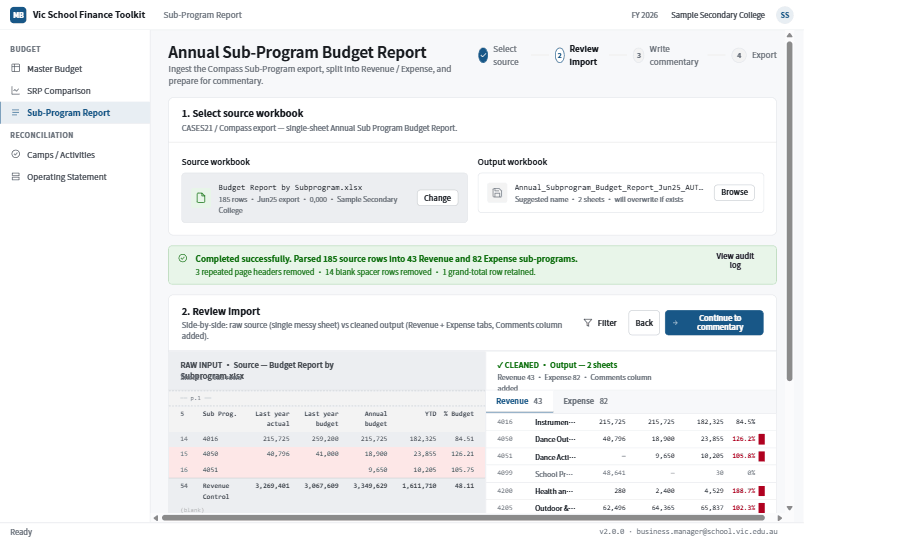
A single-window Tkinter desktop app that ships through the Microsoft Store as an MSIX. You launch it, pick the source file (Compass export, CASES21 PDF, etc.) with a file picker, click the primary button, and the output workbook lands on disk in under 30 seconds — macros preserved, highlights applied, mismatches flagged in pink, source-only insertions in green.
Three tools at v2.0.0: HYIA Transfer Code Generator (free), Master Budget Compass Autofill (free), Sub-Program Budget Report (paid, $605/yr/school inc GST). Shell + tools share one design system, one numerics contract, one PDF template engine. Adding a fourth tool is a one-line registry edit and a class that subclasses BaseTool.
Stack & why
- Python + Tkinter — every Victorian DoE laptop already has Python via the MSIX runtime, and Tkinter ships with the stdlib (no extra wheels). Qt would have been prettier but adds 80MB to the install. The choice is documented in ADR-0001.
- openpyxl + pywin32 (dual paint paths) — openpyxl runs cross-platform and powers CI tests; pywin32 drives Excel via COM on the user's machine to preserve macros and button bindings (which openpyxl alone destroys). Both paths produce visually identical output, enforced by a regression test (
test_com_interior_colour_matches_hl_mismatch). - pdfplumber — for parsing CASES21 GL21157 exports. Faster than PyMuPDF for the table-heavy DoE PDFs and ships pure-Python (no native deps to bundle in MSIX).
- WeasyPrint — the PDF cover/body templates render from HTML+CSS. Reuses the same design tokens as the Tkinter UI. ReportLab was rejected because we'd be re-implementing the design system in two places (ADR-0006).
- MSIX (not EXE) — Microsoft Store distribution requires it; auto-update for free; no scary "unknown publisher" dialog on DoE-locked laptops. Build pipeline in
build_msix_package.ps1. - Cloudflare Workers + D1 + R2 + Queues + Workers AI — backend for licence activation, OCR, admin dashboard. Single-region, low-traffic, cheap to run. Resend handles transactional email (renewal prompts, licence delivery).
Architecture
The shell is dumb. Every tool is a BaseTool subclass that declares its inputs (a discriminated union of FileInput | TextInput | NumberInput | CurrencyInput | DateInput | SecretInput), its output (where to write), and a run(paths, progress) method. The shell renders pickers, primary button, progress bar, banner, log, and result table directly from that declaration. Tools never touch shell code.
toolkit/                    ← shell, primitives, design tokens, base_tool contract
├── shell.py                ← left-rail tool picker, status bar, common surfaces
├── tokens.py               ← AUTO-GENERATED from design_system/colors_and_type.css
├── fills.py                ← HL_MISMATCH / HL_SOURCE_ONLY / HL_EDITED → openpyxl + Win32 encodings
├── primitives.py           ← BANNER_COLORS, LOG_TAGS, common widgets
└── licence.py              ← Ed25519-signed device-bound annual tokens

tools/                      ← one sub-package per tool
├── hyia/                   ← Banking · Free
├── master_budget/          ← Budget · Free · openpyxl + Win32 COM dual paint
└── sub_program/            ← Budget · Paid · pdfplumber + WeasyPrint

backend/                    ← Cloudflare Workers
├── routes/{auth,me,schools,licences,invoices,pos}
├── consumers/ocr           ← Workers AI on uploaded receipts
└── crons/renewals          ← 60/30/last-7-daily renewal prompts

reports/                    ← WeasyPrint templates for PDF outputs
docs/                       ← REQUIREMENTS, ARCHITECTURE (14 ADRs), ROADMAP, BACKEND_DESIGN
The locked surfaces are deliberate — window chrome, left rail layout, focus-ring colour, font stack, 4 px spacing grid, sentence-case button copy, Australian English, no emoji, U+2212 minus instead of hyphen. Touching them needs an ADR. Everything else (banner levels, log tags, highlight fills, tool-specific modals, extra toolbar buttons) extends without the shell knowing.
Hard parts
Preserving Excel macros across the autofill
The Master Budget workbook is .xlsm — the school's existing macros and ActiveX button bindings are load-bearing. openpyxl strips them on save. The fix is to do the autofill via Excel's COM interface (pywin32), which leaves the workbook structure untouched and only writes the cells we mean to write. But COM only runs on Windows with Excel installed, and the project also has to run cross-platform in CI — so I built two parallel paint paths and a regression test that converts pink (HL_MISMATCH = F4CCCC) through both encodings (openpyxl's ARGB "FFF4CCCC" and Win32 BGR 0xCCCCF4) and asserts they're the same fill.
Three colour encodings, one source of truth
Tkinter wants "#RRGGBB". openpyxl wants "FFRRGGBB" (ARGB, 8 chars). Win32 COM wants an integer encoded BB<<16 | GG<<8 | RR. The colours themselves come from a CSS file (design_system/colors_and_type.css) shared between the desktop app and the future web port. The pipeline: CSS → scripts/port_tokens.py generates toolkit/tokens.py → toolkit/fills.py wraps each HL_* constant in renderer-specific helpers (argb(), bgr_int()). A CI guard test (test_tokens_drift) runs port_tokens.py --check and fails the build if Python and CSS have drifted.
Licence model that survives offline laptops
School laptops are often offline for stretches (no DoE WiFi at remote sites, no cellular). A licence model that needs a server check on every launch is a non-starter. The design: device-bound annual licence tokens, Ed25519-signed by a server-held private key, cached at %LOCALAPPDATA%\Packages\<MSIX>\LocalCache\licence.json. The public verify key is embedded in toolkit/licence.py. App opens, reads cache, verifies signature, checks expiry — all offline. The only server hit is at activation (once per year per device) and the auto-renewal prompts (60 / 30 / last-7-daily before expiry).
Microsoft Store packaging quirks
MSIX expects an AppxManifest.xml with specific Capabilities (internetClient for the licence call, runFullTrust for the COM bridge to Excel), the right Identity name matching the Partner Center reservation, and asset images in seven sizes generated from one source SVG. PyInstaller bundles Python and dependencies into a single .exe; build_msix_package.ps1 wraps that into the MSIX. The Microsoft Store WACK validator was the long pole — it rejects packages with unsigned binaries, missing CRT redistributables, or any Python file with a non-compatible path length.
Result
- Live on the Microsoft Store; first paying schools pending
- Per-school time saved each close cycle: 2 hours – 1 day → under 30 minutes, depending on the tool
- 191 tests green as of M3, including the cross-renderer regression test that prevents the openpyxl/Win32 paint paths from drifting apart
- Three tools shipped: HYIA Transfer Code Generator, Master Budget Compass Autofill, Sub-Program Budget Report — all running on the same shell, design system, and numerics contract
- Zero macro-corruption incidents in the dual-paint pipeline since the regression test landed (M3)
What I'd do differently
I built the dual paint paths (openpyxl + Win32 COM) before I had the regression test that keeps them in sync. Twice in development, the two paths drifted by a single byte in the alpha channel and produced visually-identical-but-not-actually-identical fills, which only surfaced when a school got an audit query about a "different-colour highlight" in their workbook. The regression test landed in M3 and would have saved a week of debugging if it had been the first commit, not the fortieth. Rule for the next dual-renderer project: the contract test gets written before either renderer.
Screenshots
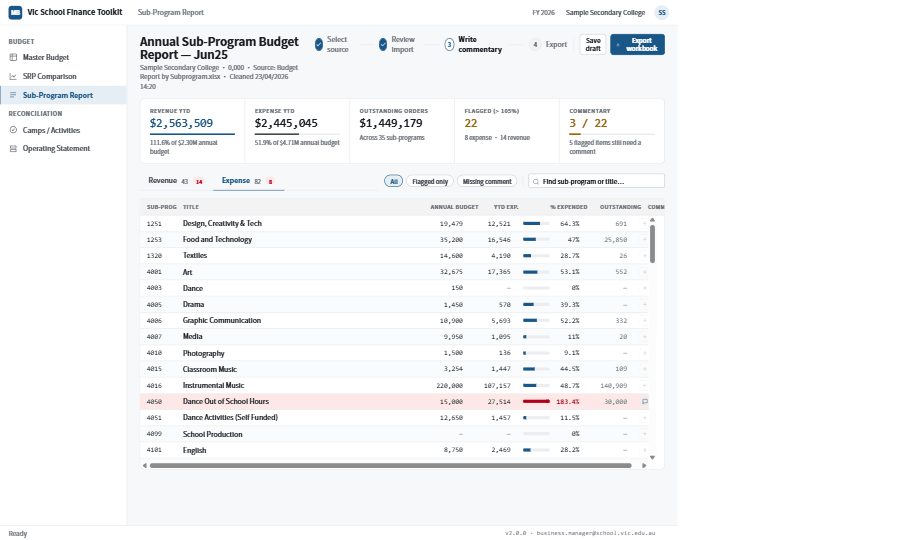
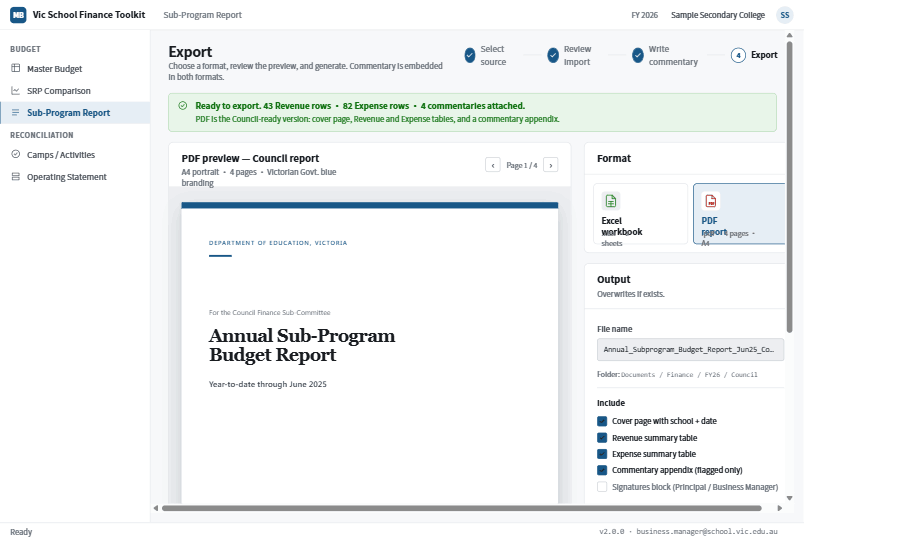
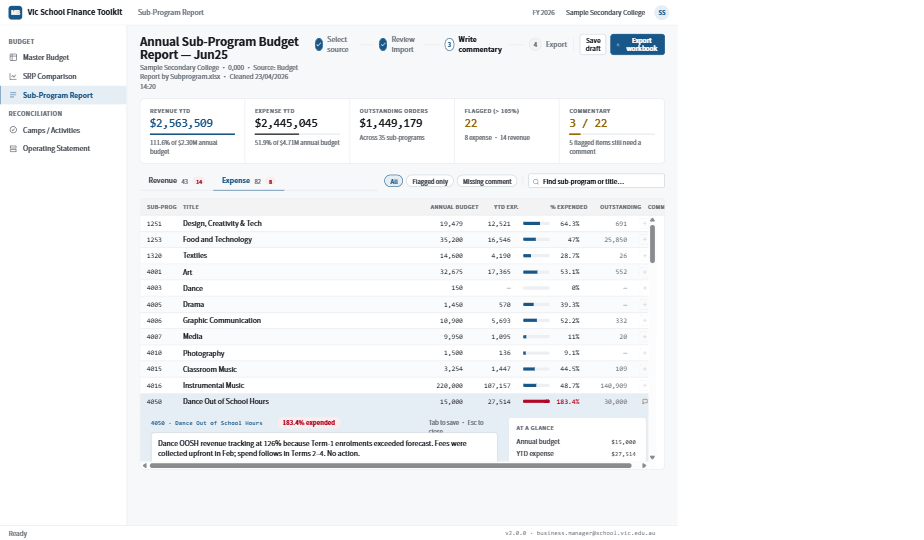
Walk-through of the Sub-Program Budget Report tool — the paid tier — taking a single CASES21 export from messy source to council-ready PDF. Demo school + dummy figures throughout; UI and workflow are real.
Companion piece
A standalone tool that predates School Tool: Master Budget Automation Tool — the v1 single-tool ancestor that proved the autofill pipeline. Now superseded by School Tool's Master Budget Compass Autofill module, but the public source repo shows the original Win32 COM approach.