Case study · Search engine on Cloudflare
PAL Quick Search
An unofficial staff search tool over 112 Department of Education PAL policies — 98 of them deep-indexed at chapter level. Multi-word, typo-tolerant, hashtag-tagged. Live at pal.schooltool.com.au.
Problem
The Department of Education's PAL (Policy and Advisory Library) is the source of truth for "what's the rule about [almost anything] in a Victorian Government school". It's also painful to use: the official site is hierarchical (drill into a category, drill again, scan a list), search is keyword-only with no typo tolerance, and policies are presented top-level — to find a specific clause inside a 20-section finance manual you click in, scroll, ctrl-F, repeat.
Staff who need to look up "what's the policy on first aid for excursions", "who signs off on a stat dec", or "where's the reconciliation template for school council" routinely give up and call the principal, or just guess.
Solution
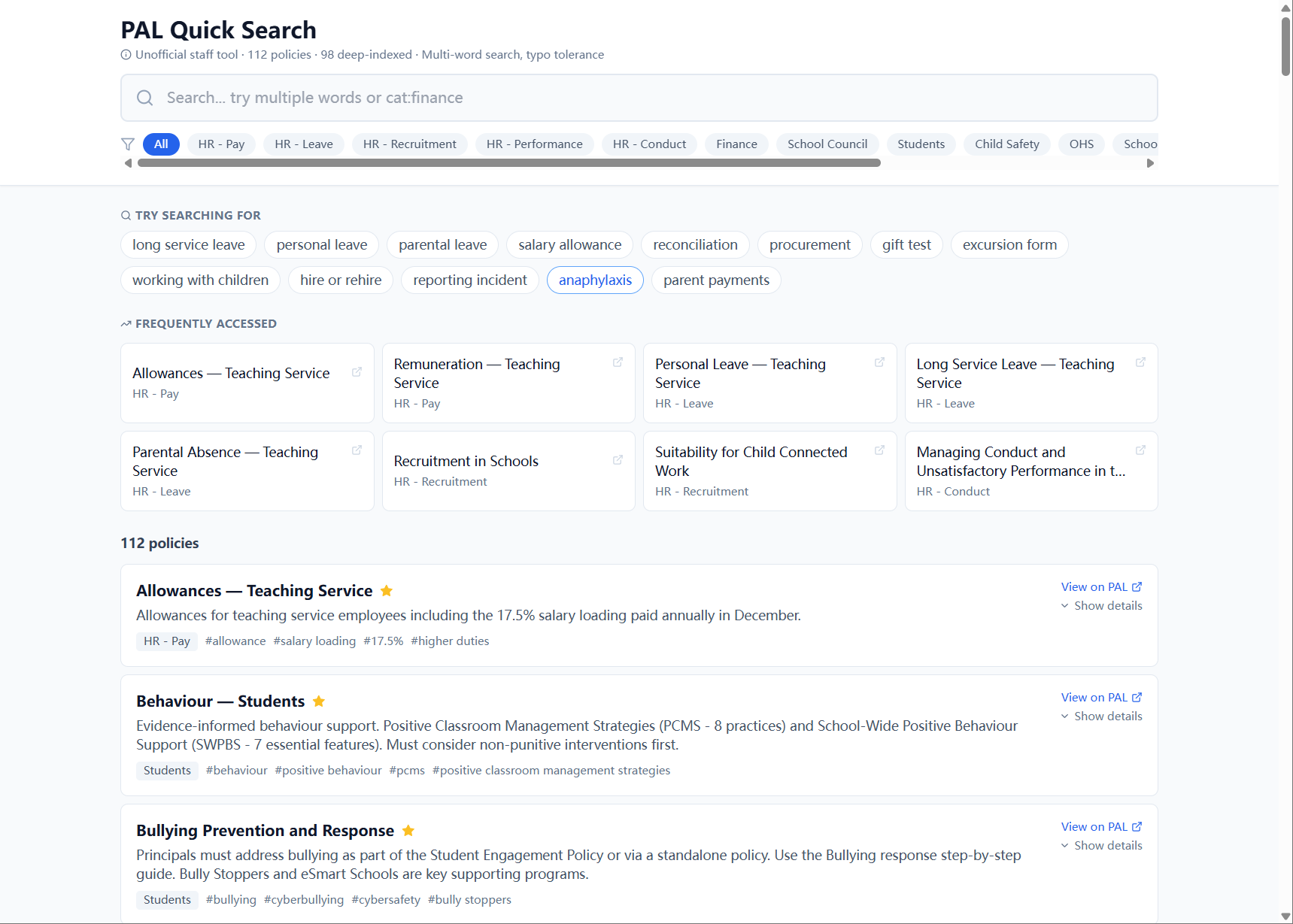
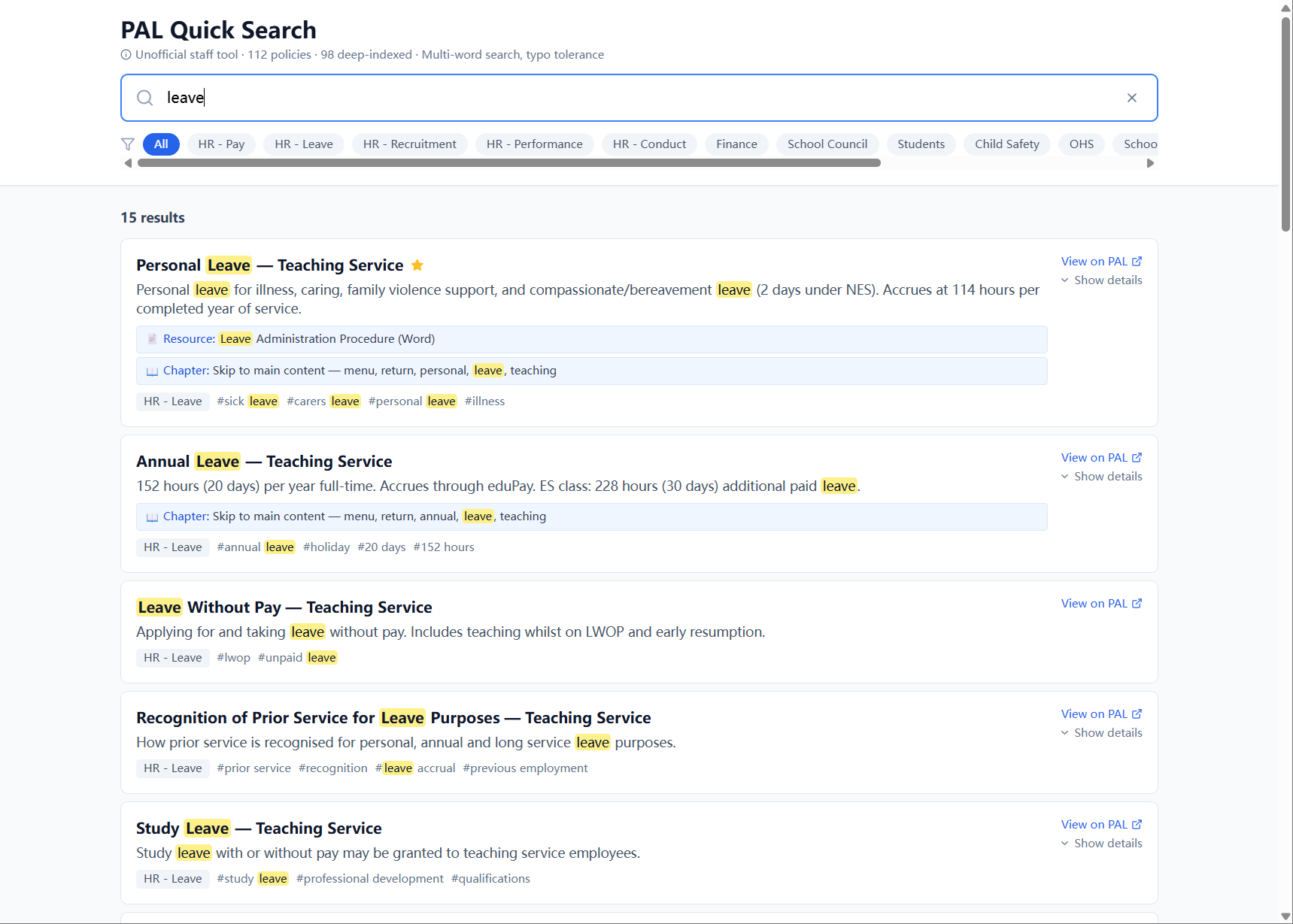
One page. Top of the screen: a search box with multi-word + typo-tolerant matching, a row of category filter chips (HR — Pay, HR — Leave, HR — Recruitment, Finance, School Council, Students, Child Safety, OHS, etc.), and a count of matches. Below: every matching policy as a card with name, summary, hashtag tags, category badge, "View on PAL ↗" external link to the official source, and a "Show details" expander that reveals chapters (numbered sections you can deep-link into), embedded resources (Word templates, DOCX procedures), and policy types (Policy and Guidelines / Guidance / Resources).
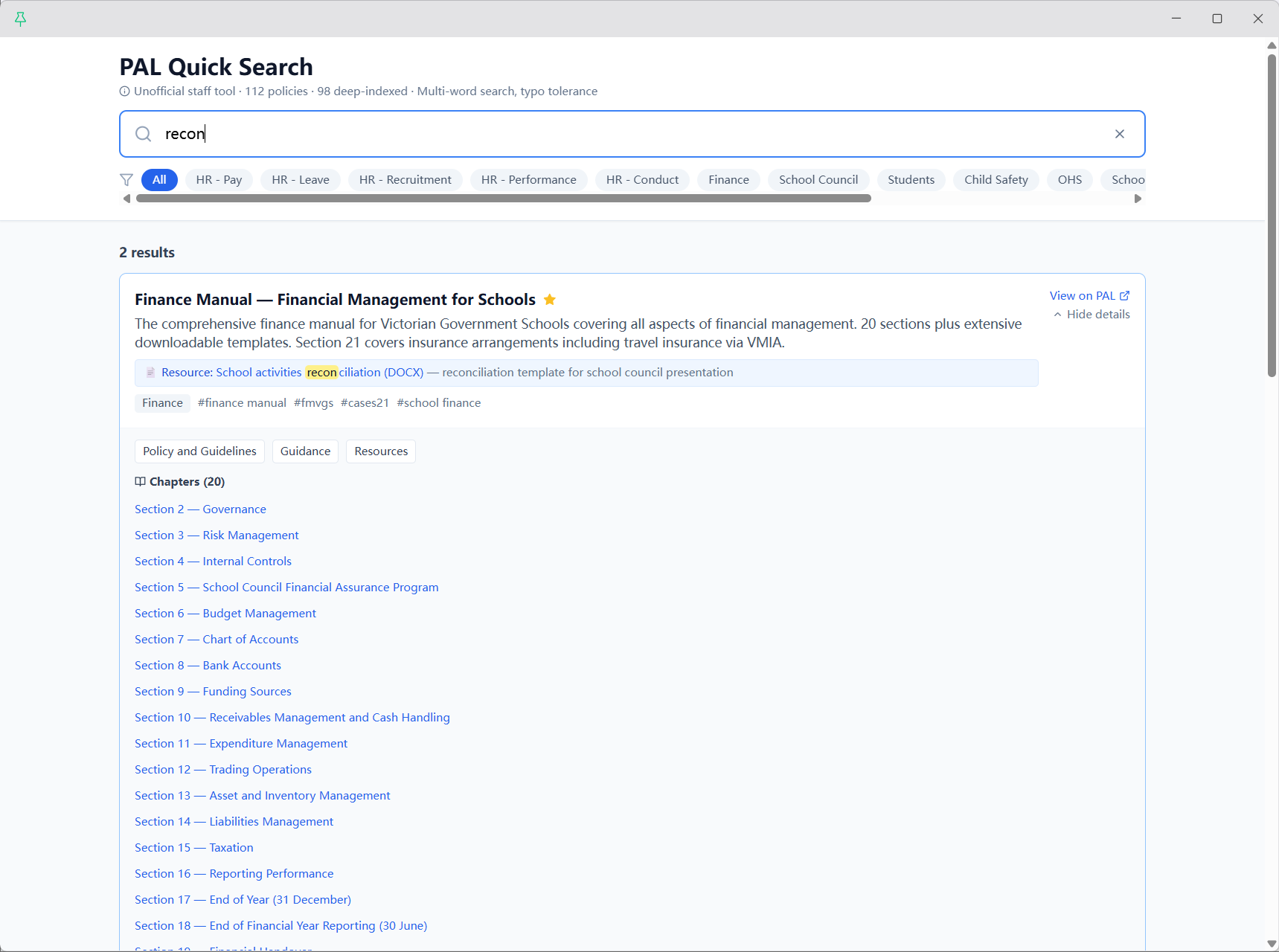
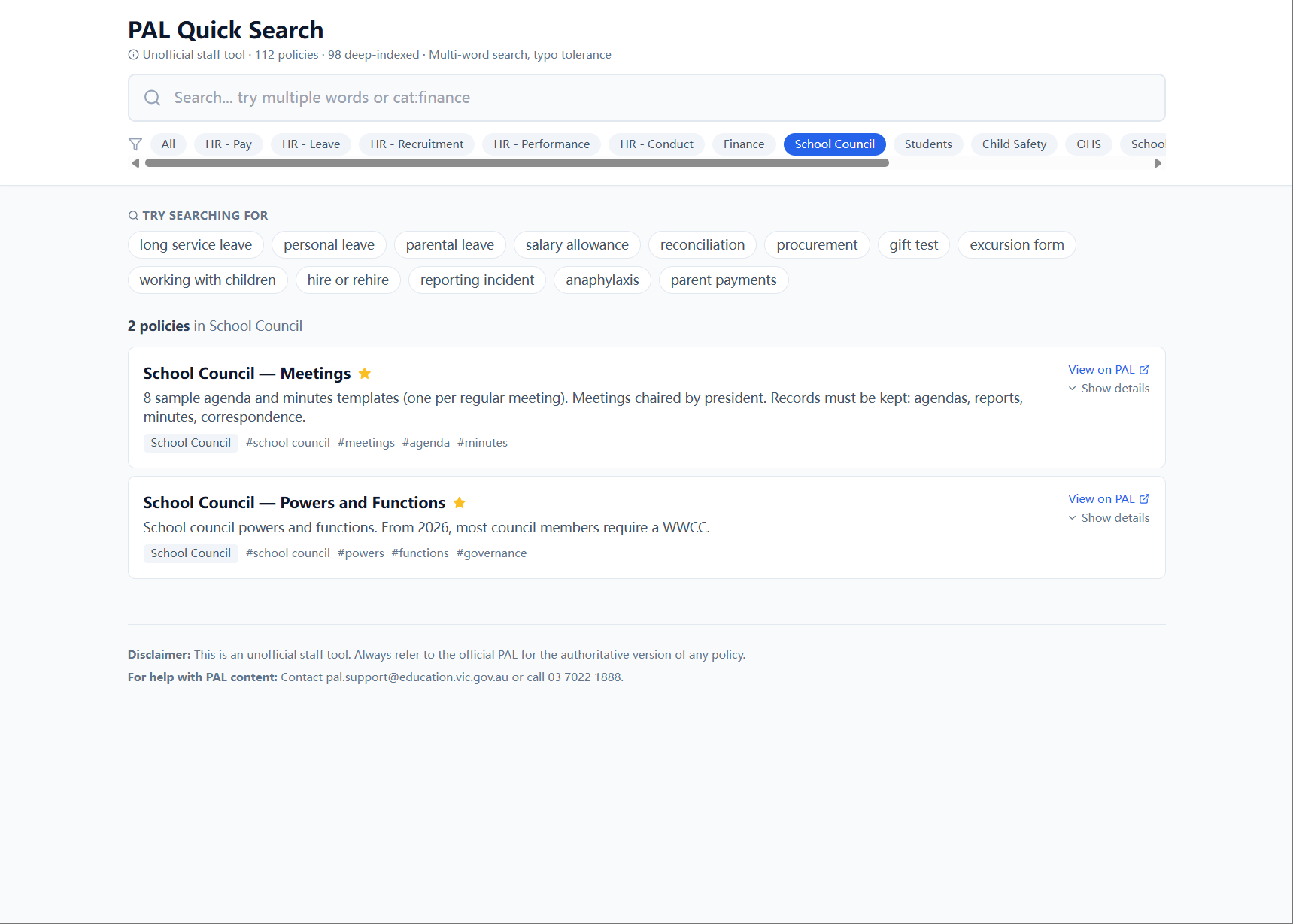
Type "first aid" — three matching cards appear instantly. Type "recon" — the Finance Manual surfaces, expanded shows 20 chapters and a deep-link to the reconciliation template DOCX. Click "School Council" — the two governance policies filter in. Hit a typo? Multi-word fuzzy matching catches it. Visit the page on a phone between classes — single-column, sticky search bar, large tap targets.
Built explicitly as an unofficial staff tool: every result links out to the canonical PAL source, and the disclaimer at the bottom makes the relationship clear.
Stack & why
- React + Vite — Vite for the build pipeline (fast HMR during dev, small bundles in prod). React because the UI is a handful of pure components driven by two pieces of state (search query, selected category) and React's reconciliation makes that trivial. Could have been vanilla JS; React was 12KB I'm willing to spend for the dev velocity.
- Tailwind — utility-first, no design system overhead for a one-page app. Two shades of brand blue + neutral; no custom theme.
- lucide-react — for the search/filter/external-link/star icons. Tree-shakes per-icon, so the imported set adds <5KB.
- Bundled dataset, not an API — the 112 policies + 98 deep-indexed chapters ship as static JSON in the build (~80KB gzipped). First paint shows the full data, no loading spinner, no roundtrip. Search runs entirely client-side on a precomputed index. Re-evaluate this when the dataset crosses ~500 policies or if user accounts get added.
- Cloudflare Pages — free tier covers this comfortably. Built-in custom domain (
pal.schooltool.com.ausits on a different DNS zone from my brand domain, requiring just a CNAME at the schooltool.com.au DNS provider). Auto-deploy on push: dataset updates ship to production in ~90 seconds. - No backend, ever — explicitly. The dataset is small and public. Adding a backend would add latency, cost, and a failure mode for zero gain.
Architecture
Single-component React app, single-route SPA, single static deploy. The interesting bit is the data pipeline that builds the bundled index.
public/
  _redirects               ← /* /index.html 200 (SPA fallback)

src/
  main.jsx                 ← mounts <PALSearch /> into #root
  PALSearch.jsx            ← the entire app: search, filter, render
  data/
    policies.json          ← 112 policies (built artifact)
    chapters.json          ← 98 deep-indexed policies' chapter lists
    suggested_queries.json ← "Try searching for" chips
    frequently_accessed.json ← featured policies (the starred ones)
  search/
    indexer.js             ← lunr-style precomputed index (multi-word + typo)
  index.css                ← @tailwind base/components/utilities

scripts/                   ← build-time pipeline (Python; not shipped to client)
  fetch_pal.py             ← scrape canonical PAL pages, validate against schema
  deep_index.py            ← parse chapter-level structure + extract resource links
  build_dataset.py         ← merge into the JSON files src/data/ imports

vite.config.js             ← @vitejs/plugin-react
tailwind.config.js
postcss.config.js
package.json               ← npm run dev / build / preview / deploy
The deploy script (npm run deploy) runs a local build then wrangler pages deploy dist for one-shot deploys. The default path is just git push origin main — Cloudflare Pages picks it up from the GitHub integration, runs the build, and ships the result to pal.schooltool.com.au in <90 seconds.
Hard parts
Deep-indexing 98 of 112 policies
Top-level matching ("does this policy mention X") was the easy half. Real value came from chapter-level indexing: the Finance Manual is one PAL entry but 20 sections deep — Section 7 is Chart of Accounts, Section 11 is Expenditure Management, Section 18 is End of Financial Year Reporting. Searching "recon" should find Section 21 (covering insurance + reconciliation), not just the manual top-page. The deep-index pipeline parses each policy's structure (when it has one), splits into chapters, indexes each separately, and surfaces the most-matched chapter when results expand. 98 of 112 policies have enough internal structure to deep-index; the remaining 14 are top-level only.
Multi-word search + typo tolerance without a backend
Browser-side fuzzy search over a few hundred indexable units sounds easy until you measure first-keystroke latency. Naive substring scan: ~80ms per keystroke on 200 entries with 14-category filter — perceptible lag. Switched to a precomputed inverted index (built at vite build time, shipped as JSON) plus a small fuzzy matcher that handles common typos and word reordering. Per-keystroke latency now <5ms on a mid-range phone.
"View on PAL" deep-links
Every result card links out to the canonical DoE PAL source — the whole point of the tool is to be a faster front door, not a replacement. The link extraction was finicky: PAL URLs vary in structure (some have stable slugs, some have query-param IDs, some are anchor-fragmented to chapter), and a wrong link silently sends staff to the homepage of the wrong section. The pipeline validates every URL at build time with a HEAD request and fails the build if any returns 404 or redirects to the PAL homepage.
Custom domain on a different DNS zone
pal.schooltool.com.au isn't in the same Cloudflare account as my brand domain. Setting it up needed a CNAME at the schooltool.com.au DNS provider pointing to the Pages *.pages.dev URL Cloudflare gave me, plus the custom domain entry on the Pages side. A few minutes for DNS to propagate and SSL to provision, then it just works. Documented in the repo README so the next person (or future me) doesn't have to retrace.
Result
- Live in production at pal.schooltool.com.au
- Coverage: 112 policies / 14 categories / 98 deep-indexed at chapter level
- Per-keystroke search latency: <5ms on mid-range mobile devices (precomputed index + fuzzy matching)
- "View on PAL" link health: 100% verified at every build (HEAD-request gate fails CI if any link breaks)
- Hosting cost: $0/month on Cloudflare Pages free tier
- Deploy time: <90 seconds from git push to live
What I'd do differently
I bundled the dataset (and the precomputed search index) into the JS payload — about 80KB gzipped for the data and 12KB for the index. That was the right call for 112 policies — first paint is the full data, no skeleton state. But it means a content update requires a full redeploy, and the JS bundle scales linearly with policy count. If I were starting over with the dataset 5× bigger, I'd put the policies in Cloudflare KV behind a tiny Workers function with edge caching, keep the UI exactly the same, and gain the ability to update content without a code deploy. For now the bundled approach is correct — but I'd watch the ~500-entry threshold.
Second thing: deep-indexing is currently a build-time pipeline. If the official PAL changes a chapter title or restructures a section, our index is stale until the next CI run. A scheduled Workers Cron Trigger that re-fetches and re-indexes weekly would catch most of these without human intervention. ~2 hours of work; high payoff for staff trust.
Screenshots
Try it
Live demo: pal.schooltool.com.au — opens instantly, no login, no install. Try searching "first aid" for a quick filter, "recon" to see deep-indexing find the right chapter, or filter by "School Council" to see category-only browsing.